COLLECTION JOURNEY
Lead with context, then let the catalog take over.
The collection template uses Collection Cinema for its hero and grid, followed by Shop The Set Cinema and service notes.
ELVESSANE / THEME DOCUMENTATION
Collection pages, list-of-collections storytelling, product filtering and set merchandising.
COLLECTION JOURNEY
The collection template uses Collection Cinema for its hero and grid, followed by Shop The Set Cinema and service notes.
ev5-collection-cinema
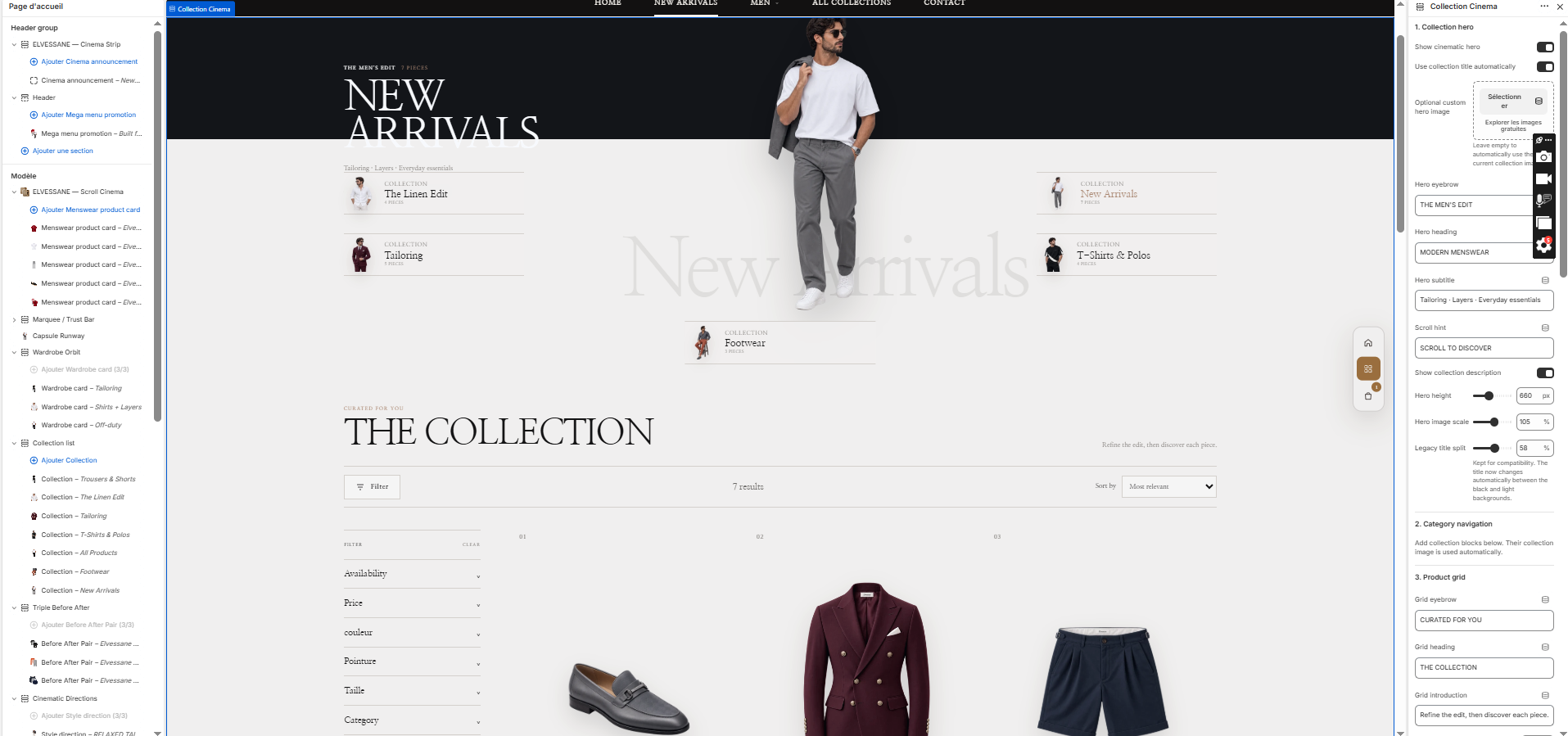
Collection hero, category navigation, filtering/sorting and product grid in one cinematic collection experience.
The hero can use the current collection image automatically or a custom image override.
| Setting | Type | Default | Options |
|---|---|---|---|
| 1. Collection hero | |||
Show cinematic heroshow_editorial_hero | checkbox | On | |
Use collection title automaticallyauto_collection_copy | checkbox | On | |
Optional custom hero imagehero_image | image_picker | ||
Hero eyebrowhero_eyebrow | text | THE MEN'S EDIT | |
Hero headinghero_heading | text | MODERN MENSWEAR | |
Hero subtitlehero_subtitle | text | Tailoring · Layers · Everyday essentials | |
Scroll hinthero_scroll_label | text | SCROLL TO DISCOVER | |
Show collection descriptionshow_description | checkbox | Off | |
Hero heighthero_height | range | 660 | |
Hero image scalehero_image_scale | range | 105 | |
Legacy title splittitle_split | range | 58 | |
| 2. Category navigation | |||
| Add collection blocks below. Their collection image is used automatically. | |||
| 3. Product grid | |||
Grid eyebrowcollection_eyebrow | text | CURATED FOR YOU | |
Grid headingcollection_heading | text | THE COLLECTION | |
Grid introductioncollection_subtitle | text | Refine the edit, then discover each piece. | |
Products per pageproducts_per_page | range | 12 | |
Desktop columnscolumns_desktop | range | 4 | |
Product gapgrid_gap | range | 18 | |
Show second image on hovershow_secondary_image | checkbox | On | |
Equalize product image sizenormalize_product_images | checkbox | On | |
Product visual heightvisual_coverage | range | 80 | |
Overall product scaleproduct_visual_size | range | 92 | |
Remove checkerboard artifactauto_remove_checkerboard | checkbox | On | |
Show vendorshow_vendor | checkbox | Off | |
Quick add labelquick_add_label | text | QUICK ADD | |
Added labeladded_label | text | ADDED | |
Sold out labelsold_out_label | text | SOLD OUT | |
| Variant drawer | |||
Drawer eyebrowdrawer_eyebrow | text | SELECT YOUR OPTION | |
Drawer titledrawer_title | text | Choose your variant | |
Drawer add buttondrawer_add_label | text | ADD TO CART | |
Adding labeladding_label | text | ADDING… | |
Loading labelloading_label | text | LOADING OPTIONS… | |
In stock labelin_stock_label | text | IN STOCK | |
Unavailable labelunavailable_label | text | UNAVAILABLE | |
| 4. Filters and sorting | |||
Enable Shopify filtersenable_filtering | checkbox | On | |
Show dropdown filters on desktopdesktop_filter_sidebar | checkbox | On | |
Enable sortingenable_sorting | checkbox | On | |
| 5. Spacing | |||
Grid top spacingpadding_top | range | 52 | |
Bottom spacingpadding_bottom | range | 60 | |
| 6. Theme colors | |||
Theme backgroundbackground | color | #F3EFE9 | |
Light surfacesurface | color | #F8F5F0 | |
Top black banddark_surface | color | #171717 | |
Dark texttext_color | color | #181512 | |
Light textlight_text | color | #F7F5F1 | |
Muted textmuted_color | color | #746D65 | |
Accentaccent | color | #B48768 | |
Linesborder | color | #D8D0C6 | |
Product corner radiuscard_radius | range | 0 | |
| Setting | Type | Default | Options |
|---|---|---|---|
Collectioncollection | collection | ||
Optional custom labellabel | text |
ev5-shop-the-set-cinema
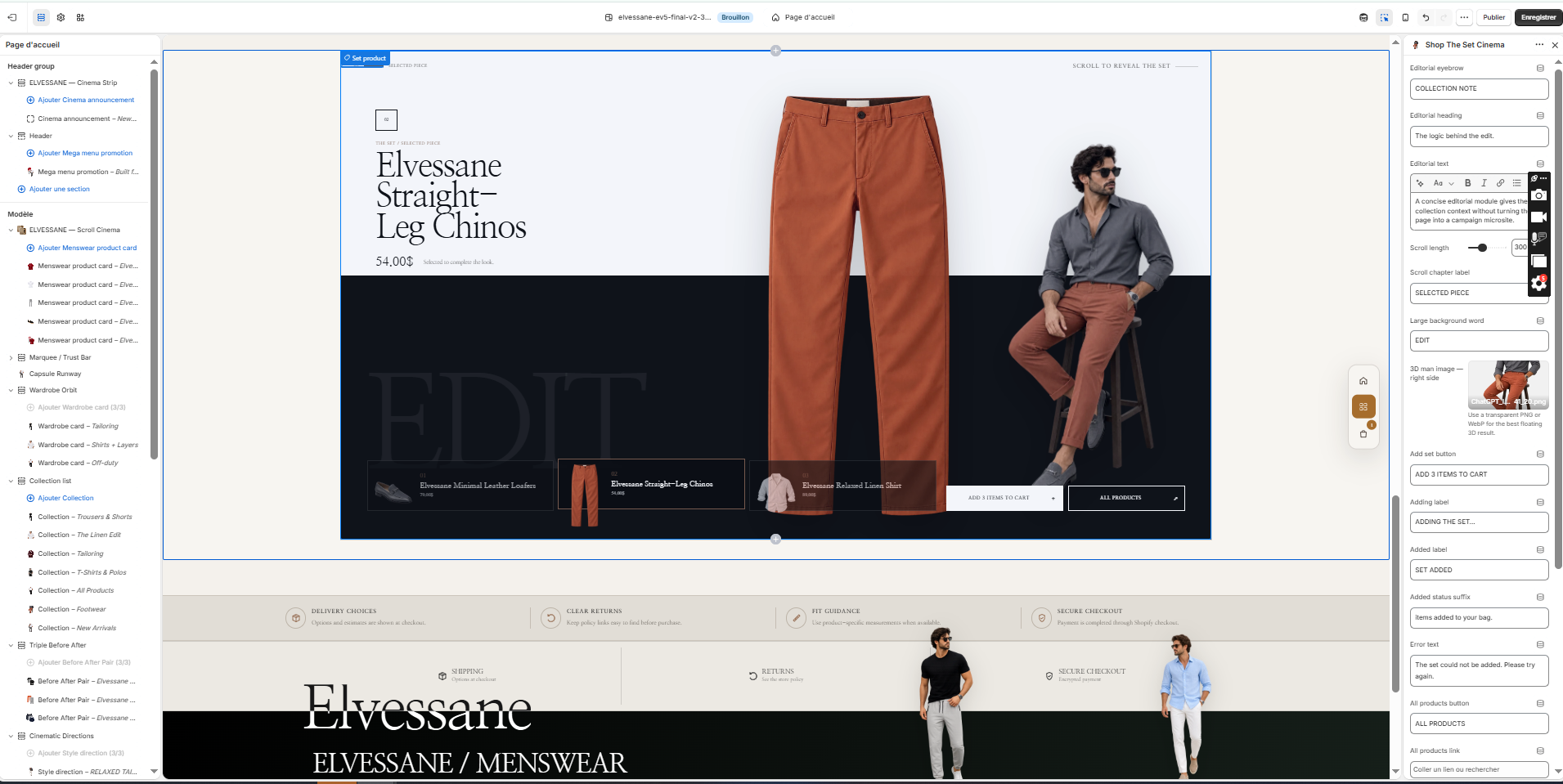
Editorial set-building module that lets the merchant select multiple complementary products and add them together.
All products in a set must have valid available variants for multi-add to succeed.
| Setting | Type | Default | Options |
|---|---|---|---|
Editorial eyebroweyebrow | text | COLLECTION NOTE | |
Editorial headingheading | text | The logic behind the edit. | |
Editorial texttext | richtext | <p>A concise editorial module gives the collection context without turning the page into a campaign microsite.</p> | |
Scroll lengthscroll_height | range | 300 | |
Scroll chapter labelchapter_label | text | SELECTED PIECE | |
Large background wordghost_word | text | SET | |
3D man image — right sidemodel_image | image_picker | ||
Add set buttonadd_all_label | text | ADD 3 ITEMS TO CART | |
Adding labeladding_label | text | ADDING THE SET… | |
Added labeladded_label | text | SET ADDED | |
Added status suffixadded_status | text | items added to your bag. | |
Error texterror_label | text | The set could not be added. Please try again. | |
All products buttonall_products_label | text | ALL PRODUCTS | |
All products linkall_products_link | url | ||
Large product image scaleproduct_scale | range | 100 | |
Vertical spacingpadding_y | range | 48 | |
Backgroundbackground | color | #F7F5F1 | |
Dark cinematic banddark_background | color | #171717 | |
Texttext_color | color | #171717 | |
Muted textmuted_color | color | #66615A | |
Accentaccent | color | #8A5B3D | |
Linesline_color | color | #D7D0C7 |
| Setting | Type | Default | Options |
|---|---|---|---|
Productproduct | product | ||
Product eyebrowlabel | text | THE SET / SELECTED PIECE | |
Short notenote | text | Selected to complete the look. |
ev5-service-notes
Short reassurance row for delivery, returns, fit guidance and secure checkout.
| Setting | Type | Default | Options |
|---|---|---|---|
Backgroundbackground | color | #E1DDD6 | |
Texttext_color | color | #171717 | |
Muted textmuted_color | color | #66615A | |
Accentaccent | color | #8A5B3D |
| Setting | Type | Default | Options |
|---|---|---|---|
Iconicon | select | package | Package, Returns, Secure, Fit, Support |
Headingheading | text | Delivery choices | |
Texttext | text | Options and estimates are shown at checkout. |
ev5-editorial-gallery
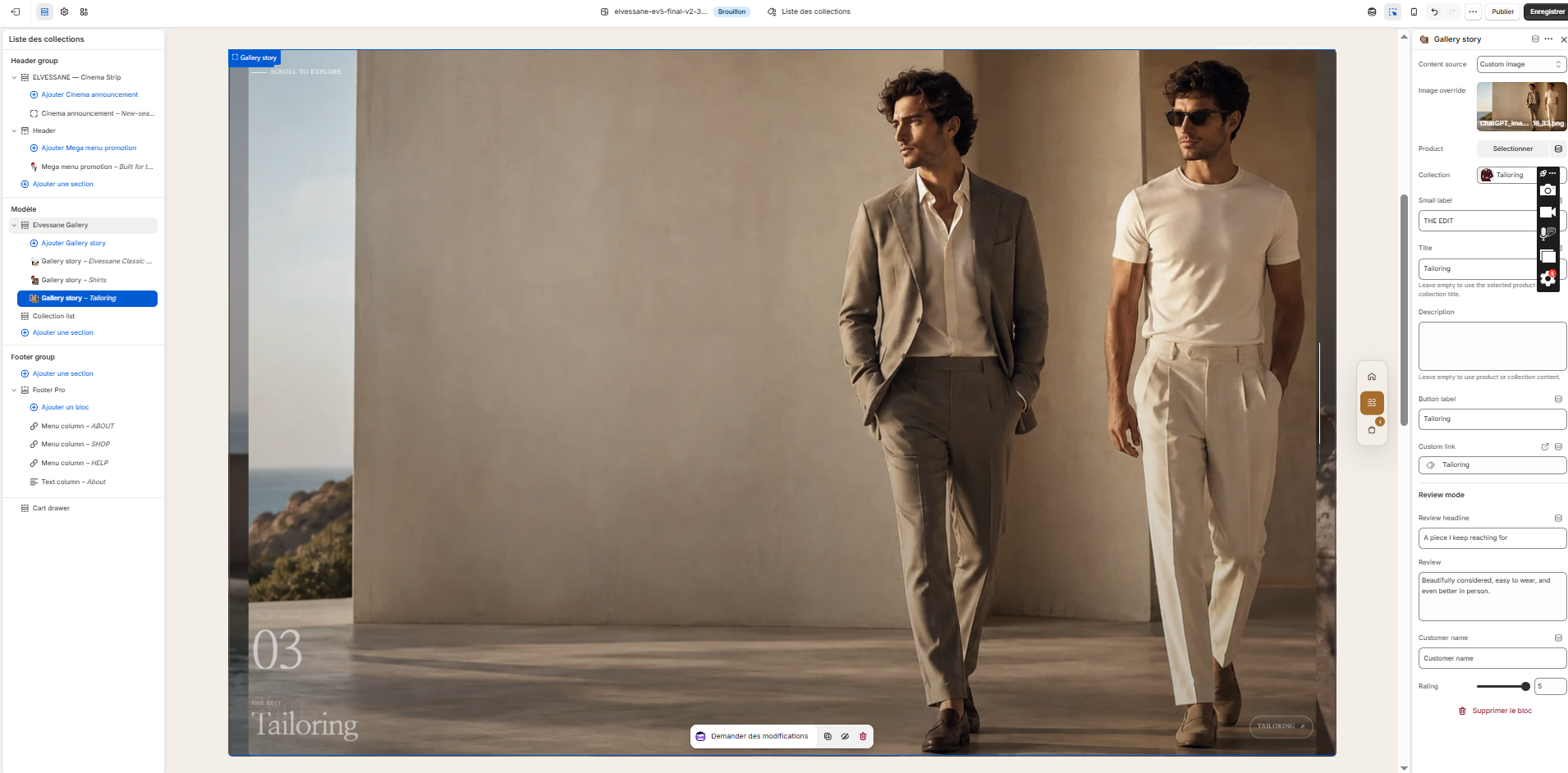
Full-bleed gallery used by the list-collections template to turn collection browsing into an editorial story.
| Setting | Type | Default | Options |
|---|---|---|---|
| Cinematic behavior | |||
Image revealreveal_style | select | center | Center expansion, Cinematic iris, Vertical aperture |
Motion distance per imagescroll_per_slide | range | 30 | |
Motion softnesssmoothing | range | 14 | |
Subtle pointer depth on desktoppointer_depth | checkbox | Off | |
Show vertical progress lineshow_progress | checkbox | On | |
Show scroll hintshow_scroll_hint | checkbox | On | |
Scroll hint textscroll_hint | text | Scroll to explore | |
| Layout | |||
Side marginside_margin | range | 3 | |
Media corner radiusmedia_radius | range | 8 | |
Desktop title sizetitle_size | range | 54 | |
Desktop number sizenumber_size | range | 96 | |
Image overlayoverlay_opacity | range | 45 | |
| Landscape image position | |||
Landscape focal point — horizontalimage_position_x | range | 50 | |
Landscape focal point — verticalimage_position_y | range | 50 | |
| Colors & label | |||
Top labelkicker | text | ELVESSANE / MATERIAL STUDIES | |
Section backgroundbackground | color | #F3EEE7 | |
Texttext_color | color | #FFFFFF | |
Muted textmuted_color | color | #D9D2CA | |
Accentaccent | color | #C89B4A | |
| Setting | Type | Default | Options |
|---|---|---|---|
Content sourcesource_type | select | custom | Custom image, Shopify product, Shopify collection, Customer review |
Image overrideimage | image_picker | ||
Productproduct | product | ||
Collectioncollection | collection | ||
Small labeleyebrow | text | THE EDIT | |
Titletitle | text | ||
Descriptiontext | textarea | ||
Button labellink_label | text | ||
Custom linklink | url | ||
| Review mode | |||
Review headlinereview_title | text | A piece I keep reaching for | |
Reviewreview_text | textarea | Beautifully considered, easy to wear, and even better in person. | |
Customer namereview_author | text | Customer name | |
Ratingreview_rating | range | 5 | |
collection.json: Collection Cinema → Shop The Set Cinema → Service Notes.
list-collections.json: Editorial Gallery → Collection List.