ELVESSANE / MENSWEARTHEME DOCUMENTATION · v2.3.3

ELVESSANE / THEME DOCUMENTATION

Homepage

Section-by-section documentation in the intended storefront order, from announcement strip to footer.

EV5
DOCS

HOMEPAGE ORDER

Build the page as an editorial journey.

The default index template already defines the intended sequence. Keep the high-impact cinematic sections early, commerce and interaction in the middle, and reassurance/content sections toward the end.
01

ev5-cinema-strip

Cinema Strip

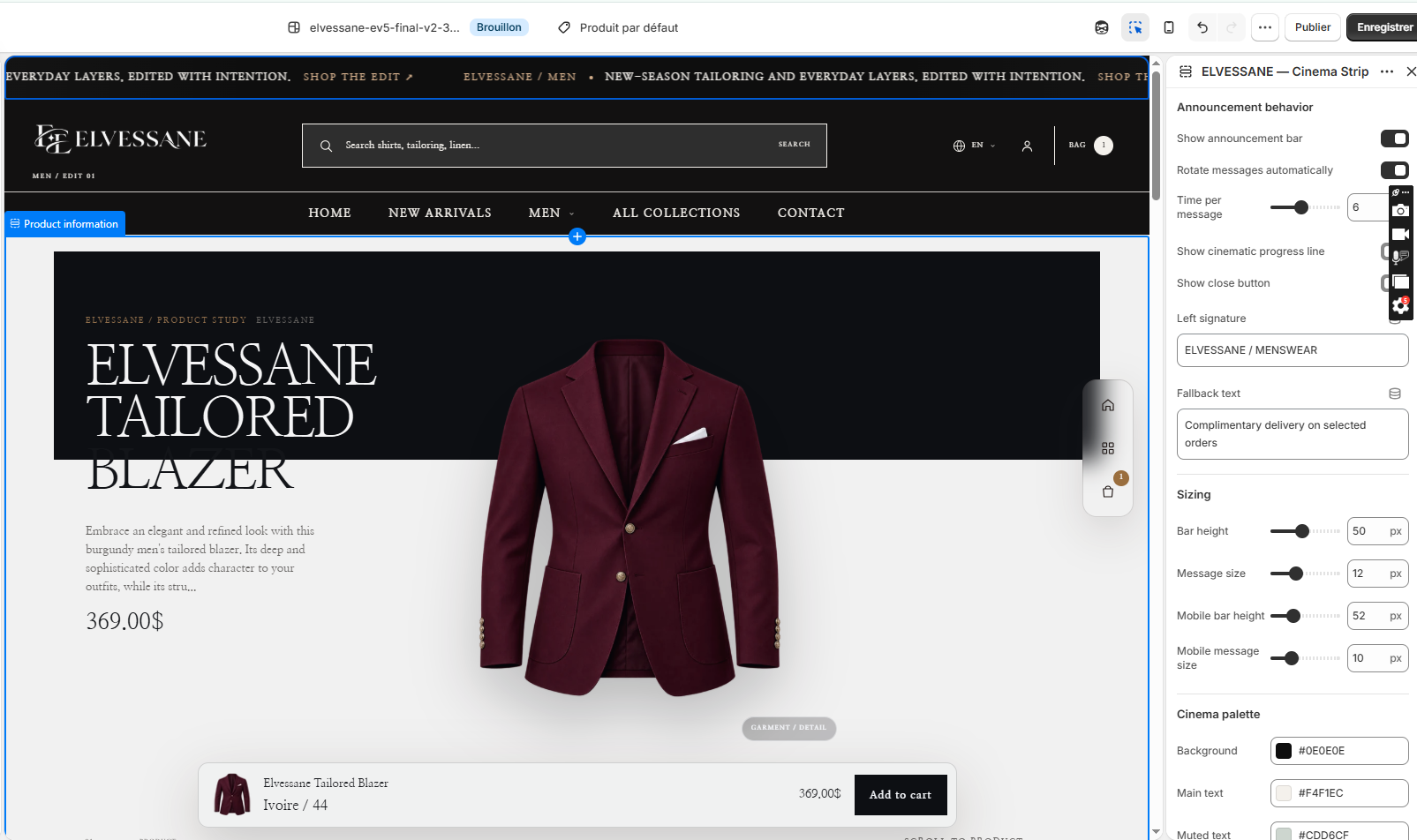
Cinema Strip in the Shopify Theme Editor

Purpose

A cinematic announcement layer above the header for editorial messages, shop links and timed rotation.

ELVESSANE NOTE

Use the cinematic progress line only when multiple messages rotate; a single message is cleaner without it.

Recommended setup

  1. Enable the announcement bar.
  2. Add one or more Cinema announcement blocks.
  3. Set timing, close behavior, signature text and palette.
  4. Keep messages concise so the strip reads cleanly on mobile.
Complete settings reference 19 settings
SettingTypeDefaultOptions
Announcement behavior
Show announcement barshow_barcheckboxOn
Rotate messages automaticallyautoplaycheckboxOff
Time per messagedelayrange5
Show cinematic progress lineshow_progresscheckboxOn
Show close buttondismissiblecheckboxOff
Left signaturesignaturetextELVESSANE / CURRENT EDIT
Fallback textfallback_texttextThe latest edit is now available.
Sizing
Bar heightheightrange36
Message sizefont_sizerange10
Mobile bar heightmobile_heightrange44
Mobile message sizemobile_font_sizerange10
Cinema palette
Backgroundbackgroundcolor#233329
Main texttext_colorcolor#F4F1EC
Muted textmuted_colorcolor#C8CEC8
Accentaccent_colorcolor#D7B28E
Fine linesline_colorcolor#233329
Cinema announcement announcement
SettingTypeDefaultOptions
Editorial labellabeltextTHE NEW EDIT
MessagetexttextA new season, tailored for movement.
Link labellink_labeltextExplore
Linklinkurl
02

ev5-header

Header

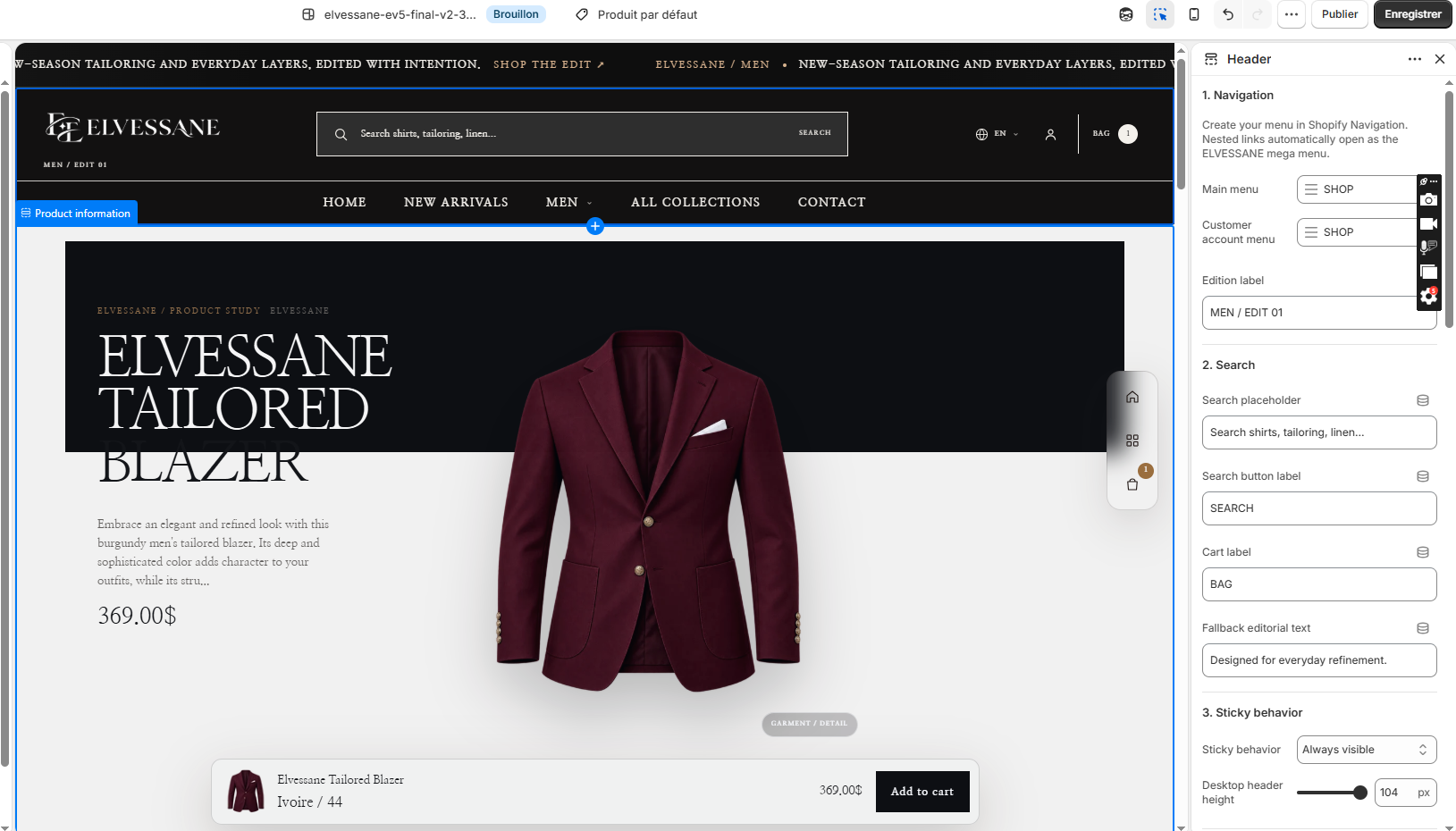
Header in the Shopify Theme Editor

Purpose

Primary storefront navigation including logo, search, main menu, account, language and bag controls.

ELVESSANE NOTE

Menus are managed in Shopify Navigation; the theme reads the selected menu rather than hard-coding links.

Recommended setup

  1. Assign your Shopify Navigation menu.
  2. Set the edition label and search placeholder.
  3. Choose sticky behavior and desktop/mobile sizing.
  4. Add the mega-menu promotion block when the main menu has nested links.
Complete settings reference 38 settings
SettingTypeDefaultOptions
1. Navigation
Create your menu in Shopify Navigation. Nested links automatically open as the ELVESSANE mega menu.
Main menumenulink_listmain-menu
Customer account menucustomer_account_menulink_listmain-menu
Edition labeledition_labeltextMEN / EDIT 01
2. Search
Search placeholdersearch_placeholdertextSearch shirts, tailoring, linen...
Search button labelsearch_labeltextSEARCH
Cart labelcart_labeltextBAG
Fallback editorial texteditorial_fallbacktextDesigned for everyday refinement.
3. Sticky behavior
Sticky behaviorsticky_behaviorselecton-scroll-upNot sticky, Always visible, Hide down, show up
Desktop header heightheader_heightrange88
4. Colors
Header backgroundbackgroundcolor#F7F4EF
Main texttext_colorcolor#191714
Secondary textmuted_colorcolor#756D65
Accentaccentcolor#8B6248
Bordersborder_colorcolor#DDD5CC
Mega menu backgroundmega_menu_backgroundcolor#171310
Mega menu main textmega_menu_textcolor#FFFFFF
Mega menu secondary textmega_menu_mutedcolor#D8D2CC
Mega menu accentmega_menu_accentcolor#C69A67
Mega menu separatorsmega_menu_separatorcolor#FFFFFF
Quick add labelquick_add_labeltextQUICK ADD
Quick add success labelquick_add_added_labeltextADDED
Second image on hovershow_secondary_imagecheckboxOn
Remove white image bgauto_remove_image_bgcheckboxOn
5. Product drawer
Drawer eyebrowdrawer_eyebrowtextSELECT YOUR OPTION
Drawer titledrawer_titletextChoose your variant
Drawer add buttondrawer_add_labeltextADD TO CART
View product labelview_product_labeltextVIEW PRODUCT
Loading labelloading_labeltextLOADING OPTIONS…
Adding labeladding_labeltextADDING…
In stock labelin_stock_labeltextIN STOCK
Sold out labelsold_out_labeltextSOLD OUT
Unavailable labelunavailable_labeltextUNAVAILABLE
Mega menu promotion menu_promotion
SettingTypeDefaultOptions
Top-level menu labelmenu_titletext
Featured collectionfeatured_collectioncollection
Featured kickerfeatured_kickertextELVESSANE EDIT
Featured headingfeatured_headingtextSelected for you
Products to showproducts_to_showselect32 products, 3 products
Show pricesshow_pricescheckboxOff
Editorial imageimageimage_picker
Editorial kickereditorial_kickertextTHE EDIT
Editorial headingheadingtextThe latest edit
Image CTAimage_ctatextDISCOVER
Editorial linklinkurl
03

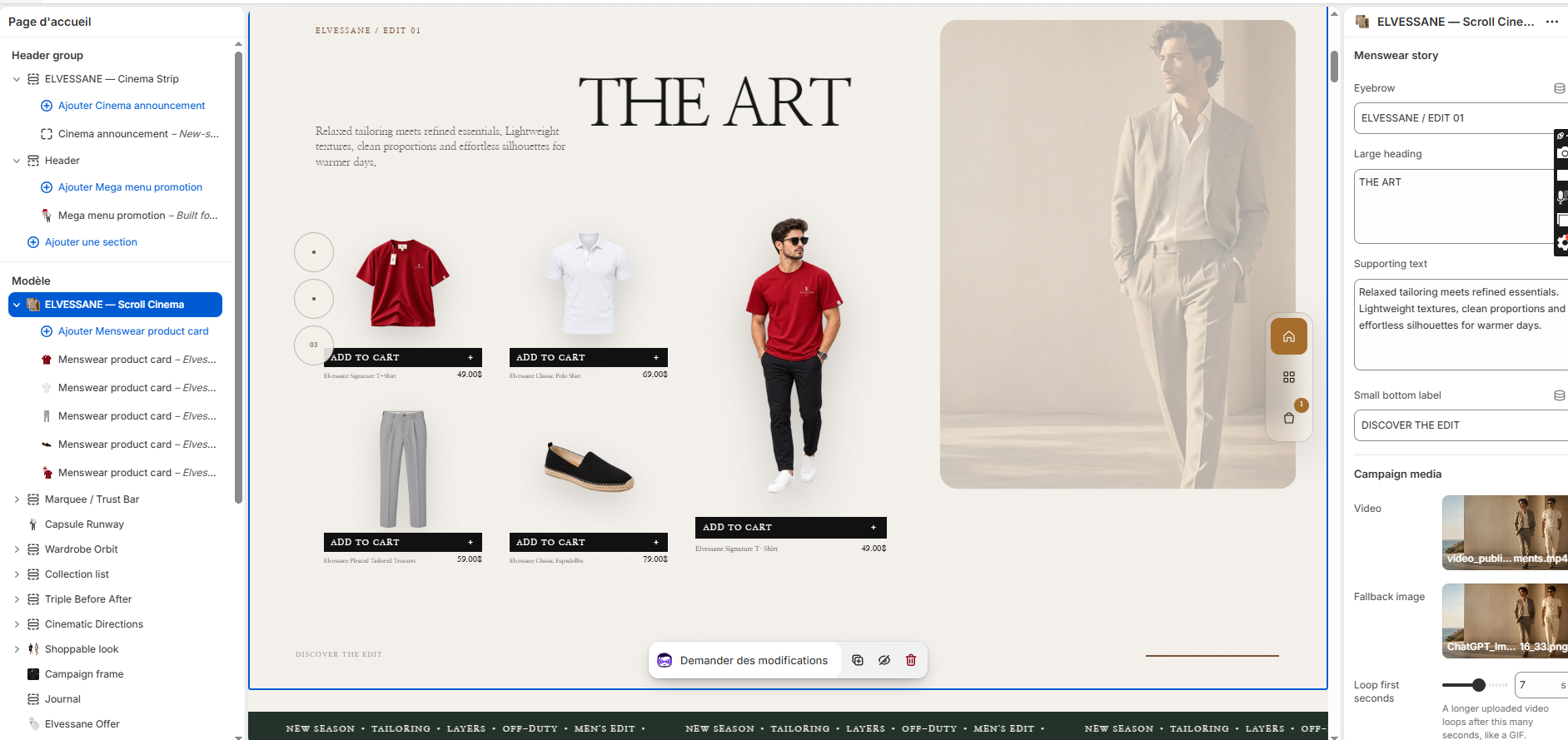
ev5-scroll-cinema

Scroll Cinema

Scroll Cinema in the Shopify Theme Editor

Purpose

Opening editorial story with product cards, campaign media and scroll-led menswear storytelling.

ELVESSANE NOTE

This is intended as the first main homepage section after the header.

Recommended setup

  1. Set campaign eyebrow, heading and support copy.
  2. Upload the campaign video and fallback image.
  3. Add menswear product card blocks and connect each to a product.
  4. Tune scroll duration and media behavior after testing mobile.
Complete settings reference 23 settings
SettingTypeDefaultOptions
Menswear story
EyebroweyebrowtextELVESSANE / MODERN MENSWEAR
Large headingheadingtextareaTHE MODERN MAN IN MOTION
Supporting textsubtexttextareaRefined essentials, relaxed tailoring and breathable layers designed for the rhythm of modern life.
Small bottom labelfooter_labeltextDISCOVER THE COLLECTION
Campaign media
Videovideovideo
Fallback imageposterimage_picker
Loop first secondsclip_secondsrange5
Video labelmedia_labeltextELVESSANE CAMPAIGN / 01
Motion
Scroll length — compactscroll_heightrange140
Desktop heading sizeheading_sizerange76
Media corner radiusradiusrange12
Colors
Backgroundbackgroundcolor#F4F0E9
Media placeholdersurfacecolor#E5DED5
Texttext_colorcolor#1D1714
Text over videooverlay_text_colorcolor#FFFFFF
Accentaccentcolor#B9873E
Product cards
Quick add labelquick_add_labeltextADD TO CART
Quick add success labelquick_add_success_labeltextADDED
Menswear product card media_card
SettingTypeDefaultOptions
Content sourcesourceselectproductImage, Product
Productproductproduct
Transparent product image overrideimageimage_picker
Label / product title overridelabeltext
Link overridelinkurl
04

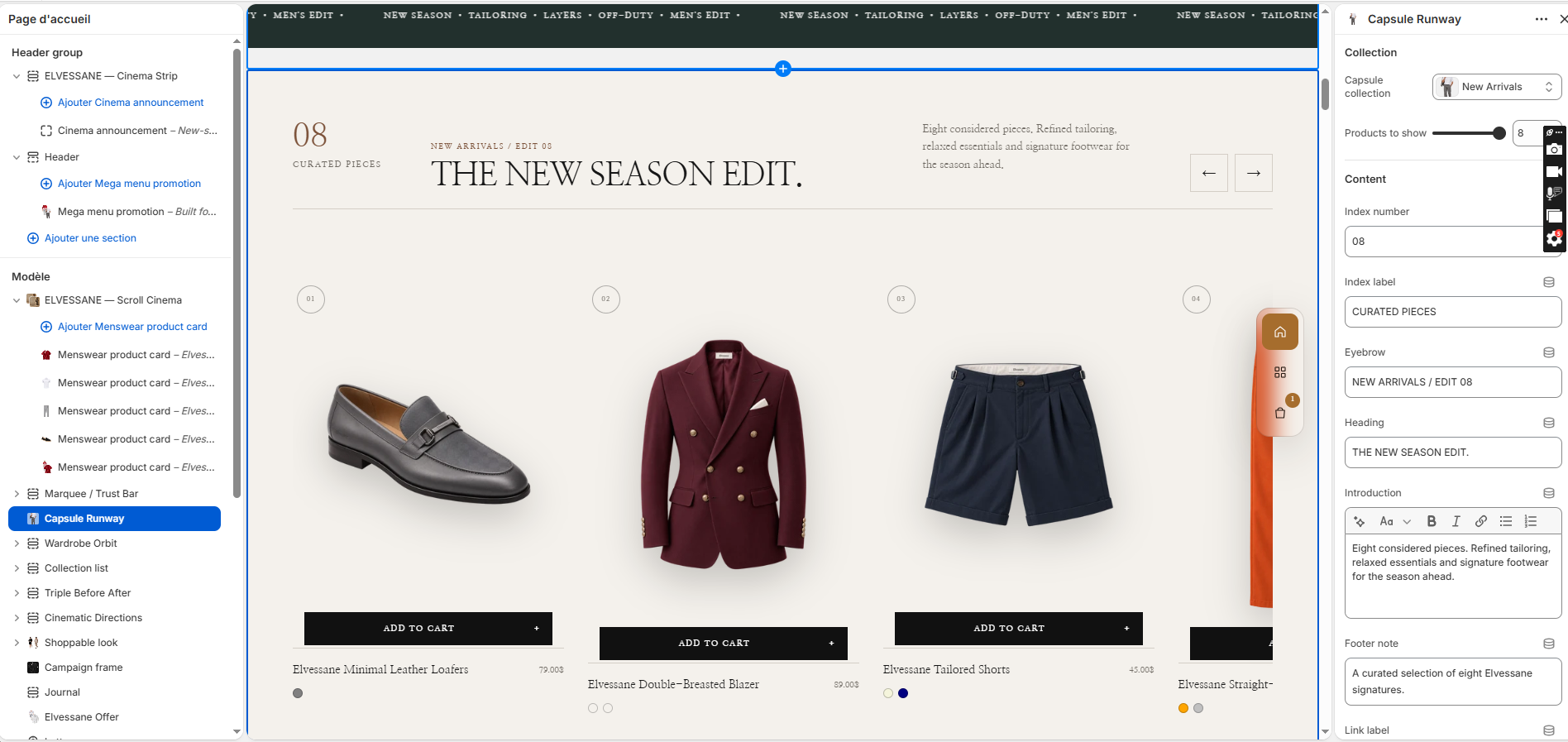
ev5-capsule-runway

Capsule Runway

Capsule Runway in the Shopify Theme Editor

Purpose

Horizontal product edit for a concise collection or New Arrivals capsule.

Recommended setup

  1. Choose the collection.
  2. Set the number of products.
  3. Edit index number, label, eyebrow, heading and introduction.
  4. Confirm product images have transparent or consistent backgrounds.
Complete settings reference 32 settings
SettingTypeDefaultOptions
Collection
Capsule collectioncollectioncollection
Products to showproducts_to_showrange8
Content
Index numberindex_numbertext08
Index labelindex_labeltextPIECE CAPSULE
EyebroweyebrowtextELVESSANE / CURATED MENSWEAR
HeadingheadingtextThe essential eight.
Introductiontextrichtext<p>Eight refined menswear pieces selected for effortless dressing — from relaxed shirting and knit polos to tailored trousers and understated footwear.</p>
Footer notefooter_notetextA focused edit of everyday pieces, elevated through proportion, texture and fit.
Link labellink_labeltextExplore the edit
Linklinkurl
Product images
Show worn look on hovershow_secondary_imagecheckboxOn
Remove white image backgroundauto_remove_image_bgcheckboxOn
Worn look size on hoverhover_scalerange115
Show hover labelshow_hover_labelcheckboxOn
Hover labelhover_labeltextWORN LOOK
Show color swatchesshow_swatchescheckboxOn
Show vendorshow_vendorcheckboxOff
Quick add
Show quick addshow_quick_addcheckboxOn
Quick add labelquick_add_labeltextADD TO CART
Quick add success labelquick_add_success_labeltextADDED
Spacing
Vertical spacingpadding_yrange48
Colors
Section backgroundbackgroundcolor#171717
Texttext_colorcolor#F6F2EB
Muted textmuted_colorcolor#AAA39A
Accentaccentcolor#B48768
Bordersbordercolor#3C3935
05

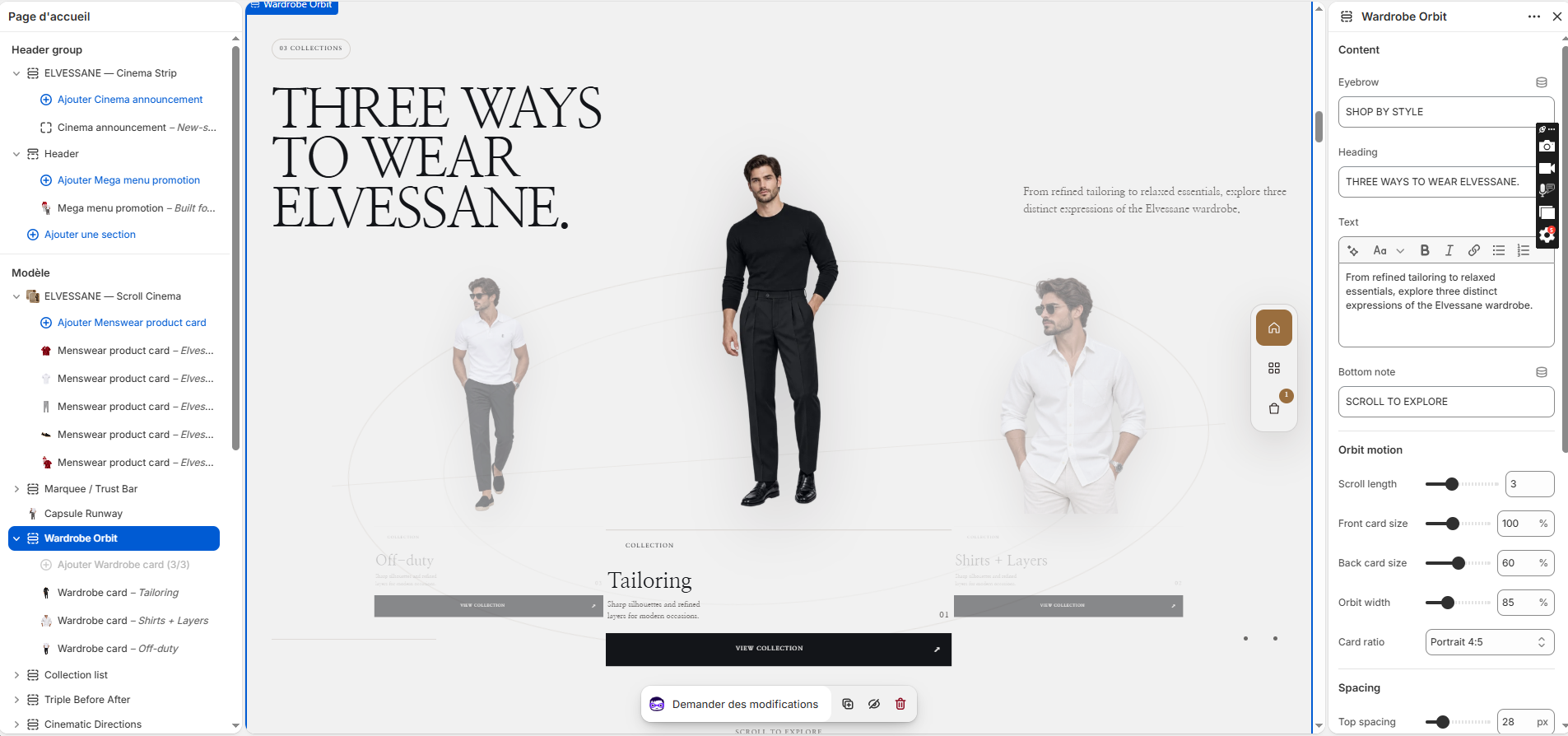
ev5-wardrobe-orbit

Wardrobe Orbit

Wardrobe Orbit in the Shopify Theme Editor

Purpose

Three rotating wardrobe directions used to browse Tailoring, Shirts + Layers and Off-duty.

ELVESSANE NOTE

Keep exactly three strong directions for the cleanest orbit composition.

Recommended setup

  1. Create three Wardrobe card blocks.
  2. Assign a collection and transparent model image to each.
  3. Set front/back card scale and orbit width.
  4. Use a short bottom note such as SCROLL TO EXPLORE.
Complete settings reference 21 settings
SettingTypeDefaultOptions
Content
EyebroweyebrowtextSHOP BY COLLECTION
HeadingheadingtextExplore three signature collections.
Texttextrichtext<p>Choose your direction through three distinct ELVESSANE collections: refined tailoring, elevated daily essentials and relaxed off-duty pieces.</p>
Bottom notefooter_texttextSCROLL TO ROTATE — SELECT A COLLECTION
Orbit motion
Scroll lengthscroll_stepsrange3
Front card sizeactive_scalerange100
Back card sizeback_scalerange60
Orbit widthorbit_widthrange95
Card ratiocard_ratioselect3/4Portrait 3:4, Portrait 4:5, Square
Spacing
Top spacingpadding_toprange28
Bottom spacingpadding_bottomrange20
Bottom safe areabottom_saferange72
Colors
Backgroundbackgroundcolor#F7F5F1
Texttext_colorcolor#171717
Muted textmuted_colorcolor#66615A
Accentaccentcolor#8A5B3D
Orbit / bordersborder_colorcolor#D9D2C8
Wardrobe card wardrobe
SettingTypeDefaultOptions
Transparent imageimageimage_picker
Collection tagcollection_tagtextCOLLECTION
Small labellabeltext01 / REFINED
Collection titleheadingtextTailoring
Short descriptiondescriptiontextSharp silhouettes and refined layers for modern occasions.
Button labelbutton_labeltextVIEW COLLECTION
Collection linklinkurl
06

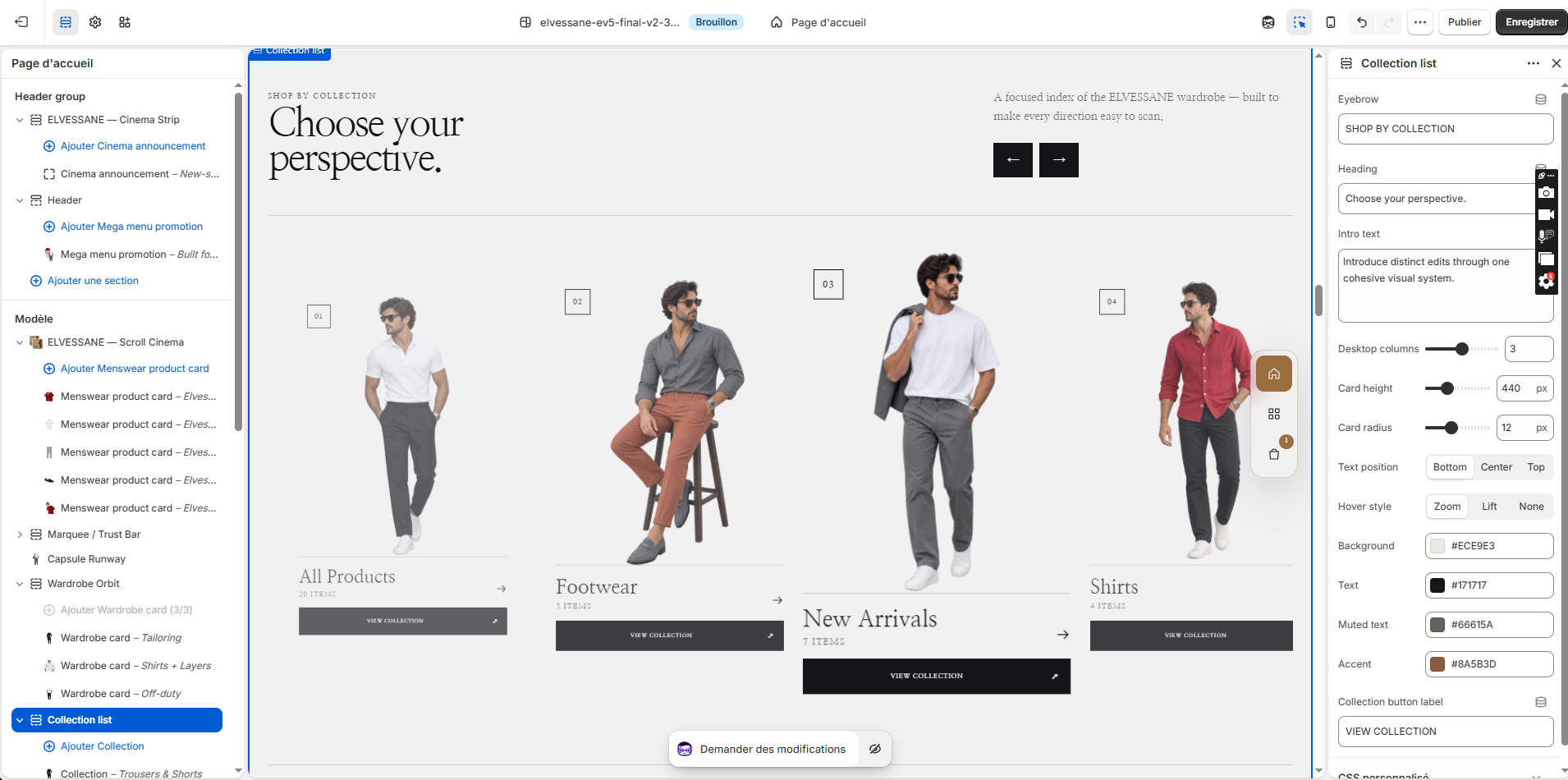
ev5-collection-list

Collection List

Collection List in the Shopify Theme Editor

Purpose

Editorial collection navigation with image-led collection cards and directional arrows.

Recommended setup

  1. Add collection blocks in desired order.
  2. Assign each card to a Shopify collection.
  3. Use consistent transparent model imagery.
  4. Choose desktop columns, card height, hover style and text position.
Complete settings reference 13 settings
SettingTypeDefaultOptions
EyebroweyebrowtextELVESSANE / MEN
HeadingheadingtextShop menswear
Intro texttexttextareaIntroduce distinct edits through one cohesive visual system.
Desktop columnscolumns_desktoprange3
Card heightcard_heightrange440
Card radiuscard_radiusrange12
Text positiontext_positionselectbottomBottom, Center, Top
Hover stylehover_styleselectzoomZoom, Lift, None
Backgroundbackgroundcolor#F4EFE8
Texttext_colorcolor#24170F
Muted textmuted_colorcolor#6F6258
Accentaccentcolor#A66D2D
Collection button labelbutton_labeltextVIEW COLLECTION
Collection collection
SettingTypeDefaultOptions
Collectioncollectioncollection
Imageimageimage_picker
Headingheadingtext
Link labellink_labeltextExplore
07

ev5-triple-before-after

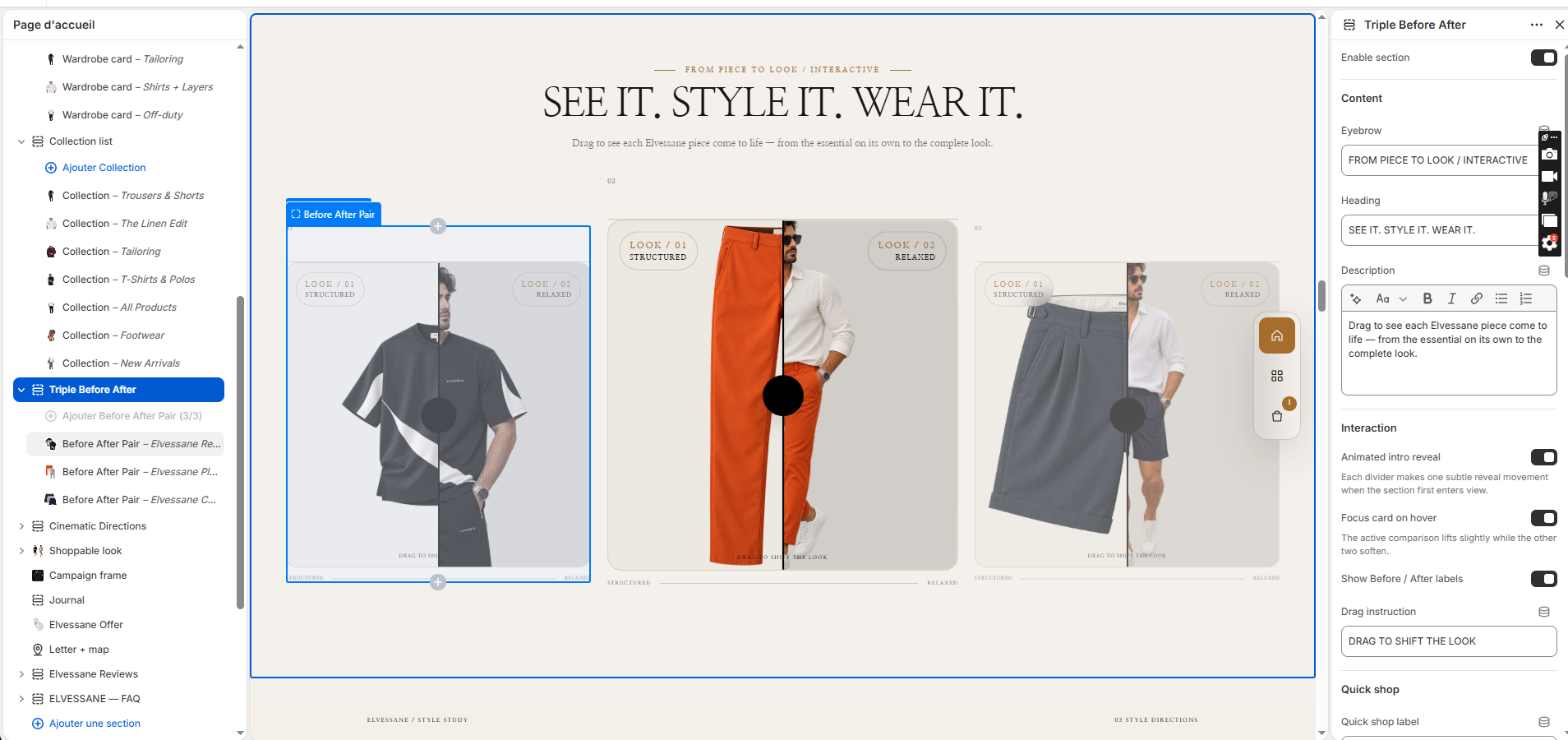
Triple Before After

Triple Before After in the Shopify Theme Editor

Purpose

Three draggable comparisons showing a product alone versus the styled/worn result.

ELVESSANE NOTE

Both comparison images should share matching framing so the reveal feels intentional.

Recommended setup

  1. Add three Before After Pair blocks.
  2. Upload the product-only image and worn image for each pair.
  3. Use clear labels such as THE PIECE / THE LOOK.
  4. Enable hover focus and intro reveal only if performance remains smooth.
Complete settings reference 37 settings
SettingTypeDefaultOptions
Enable sectionenable_sectioncheckboxOn
Content
EyebroweyebrowtextSTYLE SHIFT / INTERACTIVE
HeadingheadingtextONE PIECE. TWO ATTITUDES.
Descriptiondescriptionrichtext<p>Use matched photography to show how proportion and styling change the same piece — from considered tailoring to relaxed layering.</p>
Interaction
Animated intro revealintro_animationcheckboxOn
Focus card on hoverhover_focuscheckboxOn
Show Before / After labelsshow_labelscheckboxOn
Drag instructiondrag_texttextDRAG TO SHIFT
Quick shop
Quick shop labelquickshop_kickertextSHOP THE LOOK
View product labelview_product_labeltextVIEW
Add button labeladd_to_cart_labeltextADD TO CART
Added labeladded_labeltextADDED
Sold out labelsold_out_labeltextSOLD OUT
Layout
Card ratioaspect_ratioselect4 / 5Portrait 4:5, Portrait 3:4, Square 1:1, Landscape 4:3
Image displayimage_fitselectcontainFill frame, Show full image
Image scaleimage_scalerange100
Focused card sizefocus_scalerange108
Side card sizeside_scalerange94
After dark overlayafter_overlayrange6
Gap between comparisonscard_gaprange24
Corner radiusradiusrange4
Colors
Section backgroundbg_colorcolor#F3EFE9
Before image surfacebefore_surfacecolor#ECE8E2
After image surfaceafter_surfacecolor#DEDAD4
Headingtitle_colorcolor#181512
Descriptiontext_colorcolor#746D65
Accentaccent_colorcolor#B48768
Divider and handlehandle_colorcolor#181512
Handle backgroundhandle_bg_colorcolor#F3EFE9
Spacing
Top paddingpadding_toprange36
Bottom paddingpadding_bottomrange36
Before After Pair comparison
SettingTypeDefaultOptions
Comparison titlecard_titletextRELAXED STRUCTURE
Small notecard_notetextSTYLE STUDY
Linked productproductproduct
Before imageimage_1image_picker
After imageimage_2image_picker
Before small labelbefore_kickertextLOOK / 01
Before labelbefore_labeltextSTRUCTURED
After small labelafter_kickertextLOOK / 02
After labelafter_labeltextRELAXED
Initial dividerinitial_positionrange50
Accessibility labelaccessibility_labeltextDrag to compare the two styling directions
08

ev5-cinematic-directions

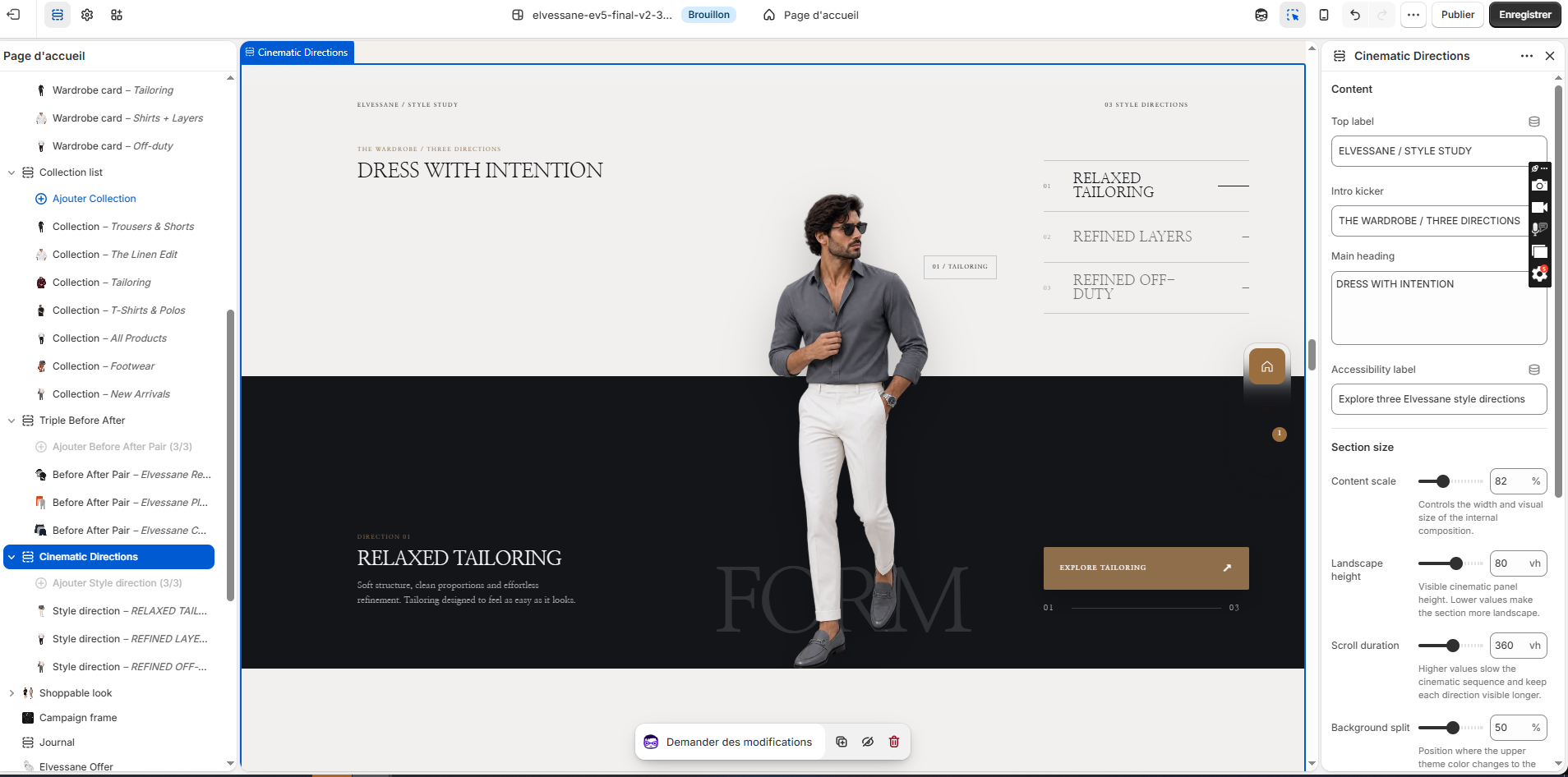
Cinematic Directions

Cinematic Directions in the Shopify Theme Editor

Purpose

Scroll-driven style study presenting three fashion directions with a foreground model and split-color stage.

Recommended setup

  1. Add three Style direction blocks.
  2. Use transparent model imagery.
  3. Link each direction to its relevant collection.
  4. Tune content scale, landscape height, scroll duration and background split.
Complete settings reference 18 settings
SettingTypeDefaultOptions
Content
Top labeleyebrowtextSILHOUETTE LAB / INTERACTIVE
Intro kickerintro_kickertextTHE WARDROBE / THREE WAYS
Main headingheadingtextareaDRESS WITH INTENTION
Accessibility labeltablist_labeltextELVESSANE style directions
Section size
Content scalesection_scalerange82
Landscape heightstage_heightrange88
Scroll durationscroll_lengthrange360
Background splitsplit_positionrange50
Colors
Upper backgroundtop_backgroundcolor#F4F0E9
Lower backgroundbottom_backgroundcolor#171717
Upper texttop_textcolor#171717
Lower textbottom_textcolor#F7F5F1
Muted textmuted_colorcolor#AAA39B
Accentaccentcolor#B48768
Linesline_colorcolor#3A3733
Style direction direction
SettingTypeDefaultOptions
Right menu labellabeltextRELAXED STRUCTURE
Transparent model imageimageimage_picker
Large wordghost_wordtextFORM
Media notemedia_notetext01 / STRUCTURE
Direction headingheadingtextRelaxed structure
Descriptiontextrichtext<p>Soft shoulders, clean trousers and measured volume. Tailoring with structure, without stiffness.</p>
Optional productproductproduct
Custom linklinkurl
Button labellink_labeltextEXPLORE THE DIRECTION
09

ev5-shoppable-look

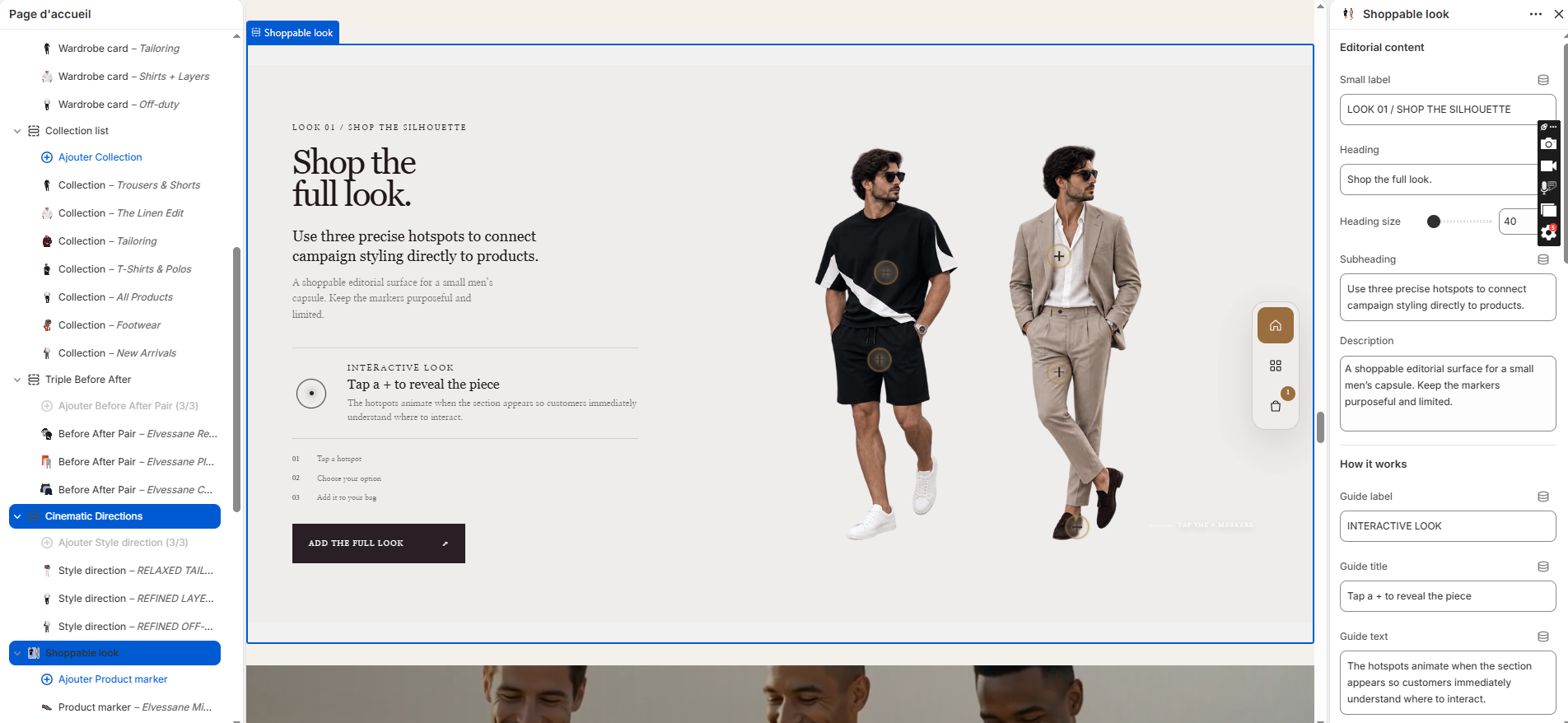
Shoppable Look

Shoppable Look in the Shopify Theme Editor

Purpose

Interactive look composition with product hotspots and optional add-the-full-look behavior.

ELVESSANE NOTE

Keep markers purposeful; too many hotspots reduce clarity on mobile.

Recommended setup

  1. Upload the look image or transparent model composition.
  2. Add Product marker blocks and place them carefully.
  3. Connect every marker to the correct product.
  4. Set guide copy so customers understand the hotspot interaction.
Complete settings reference 38 settings
SettingTypeDefaultOptions
Editorial content
Small labeleyebrowtextLOOK 01 / SHOP THE SILHOUETTE
HeadingheadingtextShop the full look.
Heading sizeheading_sizerange54
SubheadingsubheadingtextUse precise hotspots to connect styling directly to products.
DescriptiondescriptiontextareaExplore the silhouette and discover each piece directly from the editorial image.
How it works
Guide labelguide_kickertextINTERACTIVE LOOK
Guide titleguide_titletextTap a glowing marker
Guide textguide_texttextEach illuminated point reveals a product from the look.
Step 1step_1textTap a hotspot
Step 2step_2textChoose your option
Step 3step_3textAdd it to your bag
Image corner noteimage_notetextTap the glowing markers
Editorial image
Look imageimageimage_picker
Image corner radiusimage_radiusrange0
Hotspots
Hotspot sizehotspot_sizerange46
Shopping actions
Add to cart labeladd_to_cart_labeltextAdd to bag
Show Add full lookshow_add_allcheckboxOn
Add all labeladd_all_labeltextAdd the full look
Colors
Section backgroundbg_colorcolor#F2EDE6
Main texttext_colorcolor#281A12
Muted textmuted_colorcolor#786A61
Accentaccent_colorcolor#B77A2B
Bordersborder_colorcolor#D9CEC3
Product popup
Popup backgroundcard_bgcolor#FFFDF9
Popup textcard_textcolor#281A12
Popup bordercard_bordercolor#DED3C8
Layout
Text column widthtext_column_widthrange420
Maximum widthmax_widthrange1800
Desktop side spacingside_paddingrange24
Vertical spacingpadding_yrange32
Product marker hotspot
SettingTypeDefaultOptions
Productproductproduct
Vertical positionposition_toprange50
Horizontal positionposition_leftrange50
10

ev5-campaign-frame

Campaign Frame

Purpose

Video/image campaign frame for a short seasonal message and collection CTA.

Recommended setup

  1. Upload Shopify-hosted video and fallback media.
  2. Use a short eyebrow, large heading and one CTA.
  3. Adjust overlay for text legibility.
  4. Verify autoplay is muted and mobile height is appropriate.
Complete settings reference 20 settings
SettingTypeDefaultOptions
Media
Image / video posterimageimage_picker
Shopify-hosted videovideovideo
Autoplay muted videoautoplaycheckboxOff
Loop videoloopcheckboxOff
Show video controlsshow_controlscheckboxOn
Desktop heightdesktop_heightrange500
Mobile heightmobile_heightrange520
Overlayoverlay_opacityrange35
Content
Content positioncontent_positionselectcenterLeft, Center, Right
EyebroweyebrowtextEVENING STUDY / 02
HeadingheadingtextBuilt for the hours after work.
Texttextrichtext<p>Use a strong campaign image or short film here. Keep the copy concise and let the styling carry the story.</p>
Link labelbutton_labeltextExplore the edit
Linkbutton_linkurl
Chapter labelchaptertext02 / CAMPAIGN
Media labelmedia_labeltextMOTION / OPTIONAL
Texttext_colorcolor#FFFFFF
Accentaccentcolor#D7B28E
11

ev5-journal

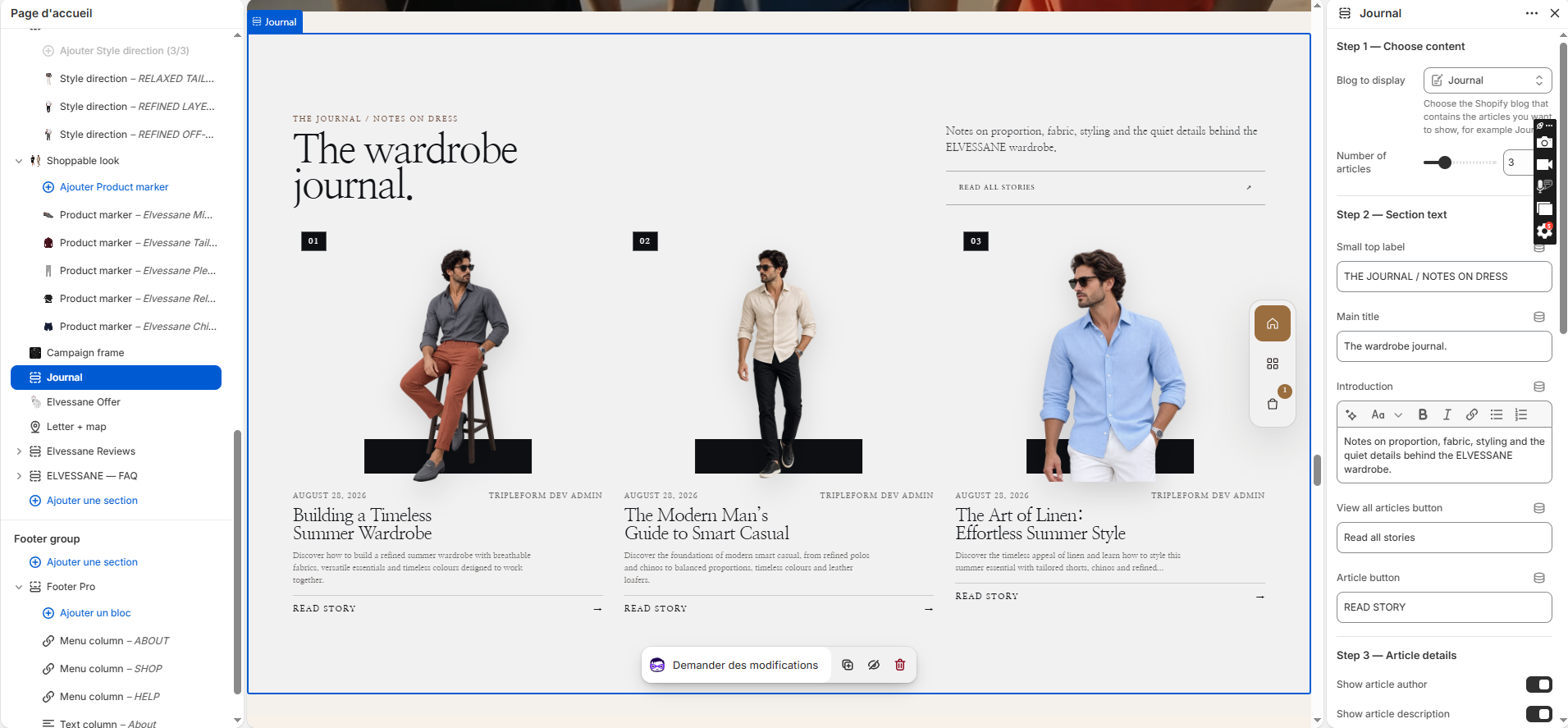
Journal

Journal in the Shopify Theme Editor

Purpose

Editorial blog feed that surfaces selected Journal articles directly on the homepage.

Recommended setup

  1. Create a Shopify blog such as Journal.
  2. Select it in the section.
  3. Choose the number of articles.
  4. Set section labels and article button copy.
  5. Use consistent article imagery.
Complete settings reference 30 settings
SettingTypeDefaultOptions
Step 1 — Choose content
Blog to displayblogblog
Number of articlesarticles_to_showrange3
Step 2 — Section text
Small top labeleyebrowtextTHE JOURNAL
Main titleheadingtextStories worth keeping.
Introductionintrorichtext<p>Notes on proportion, fabric, styling and the quiet details behind the ELVESSANE wardrobe.</p>
View all articles buttonlink_labeltextVIEW THE JOURNAL
Article buttonread_more_labeltextREAD STORY
Step 3 — Article details
Show article authorshow_authorcheckboxOn
Show article descriptionshow_excerptcheckboxOn
Description lengthexcerpt_wordsrange20
Show 01 / 02 / 03 on imagesshow_indexcheckboxOn
Step 4 — Layout
Desktop columnscolumns_desktoprange3
Section scalesection_scalerange90
Space between articlescard_gaprange32
Image corner radiusimage_radiusrange4
Top spacingpadding_toprange40
Bottom spacingpadding_bottomrange40
Step 5 — Colors
Backgroundbackgroundcolor#ECE9E3
Texttext_colorcolor#171717
Muted textmuted_colorcolor#66615A
Accentaccentcolor#B48768
Linesline_colorcolor#D2CBC3
Placeholder content
Placeholder titleplaceholder_titletextA study in modern menswear.
Placeholder textplaceholder_texttextareaChoose a blog above to replace these demo cards with your real articles.
12

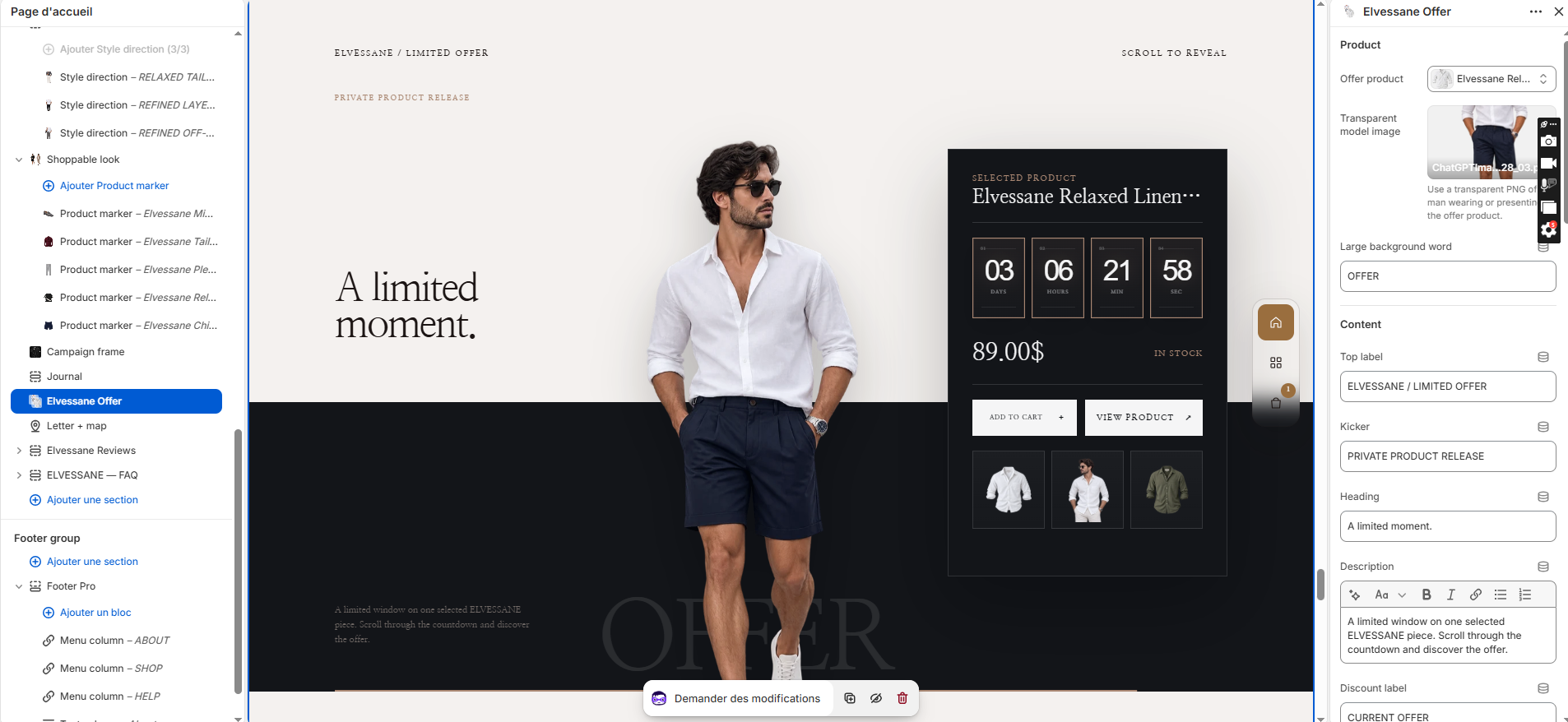
ev5-3d-countdown-offer

Limited Offer

Limited Offer in the Shopify Theme Editor

Purpose

A selected-product campaign with countdown, transparent model image, variants and add-to-cart.

ELVESSANE NOTE

Avoid fake scarcity. The timer should represent a real merchant promotion.

Recommended setup

  1. Choose the offer product.
  2. Upload the transparent model image.
  3. Set campaign labels, countdown deadline and CTA text.
  4. Use only for genuine timed offers; remove or disable when no real offer exists.
Complete settings reference 41 settings
SettingTypeDefaultOptions
Product
Offer productproductproduct
Transparent model imagemodel_imageimage_picker
Large background wordghost_wordtextOFFER
Content
Top labeleyebrowtextELVESSANE / LIMITED OFFER
KickerkickertextPRIVATE PRODUCT RELEASE
HeadingheadingtextA MOMENT WORTH WEARING.
Descriptiondescriptionrichtext<p>A limited window on one selected ELVESSANE piece. Scroll through the countdown and discover the offer.</p>
Discount labeldiscount_labeltextCURRENT OFFER
Offer card labeloffer_labeltextSELECTED PRODUCT
Scroll instructionscroll_labeltextSCROLL TO UNLOCK THE OFFER
Countdown
End date and timeend_datetext
Theme editor preview durationfallback_hoursrange96
Days labeldays_labeltextDAYS
Hours labelhours_labeltextHOURS
Minutes labelminutes_labeltextMINUTES
Seconds labelseconds_labeltextSECONDS
Product actions
Add to cart labeladd_to_cart_labeltextADD TO CART
View product labelview_product_labeltextVIEW PRODUCT
Adding labeladding_labeltextADDING…
Added labeladded_labeltextADDED
In stock labelin_stock_labeltextIN STOCK
Sold out labelsold_out_labeltextSOLD OUT
Unavailable labelunavailable_labeltextUNAVAILABLE
Cinematic motion
Section scalesection_scalerange88
Scroll durationscroll_lengthrange400
Visible section heightstage_heightrange80
Model image scalemodel_scalerange100
Background splitsplit_positionrange50
Theme colors
Theme backgroundbackgroundcolor#F3EFE9
Black backgrounddark_backgroundcolor#171717
Dark texttext_colorcolor#181512
Light textlight_textcolor#F7F5F1
Muted textmuted_colorcolor#746D65
Accentaccentcolor#B48768
Linesline_colorcolor#D8D0C6
13

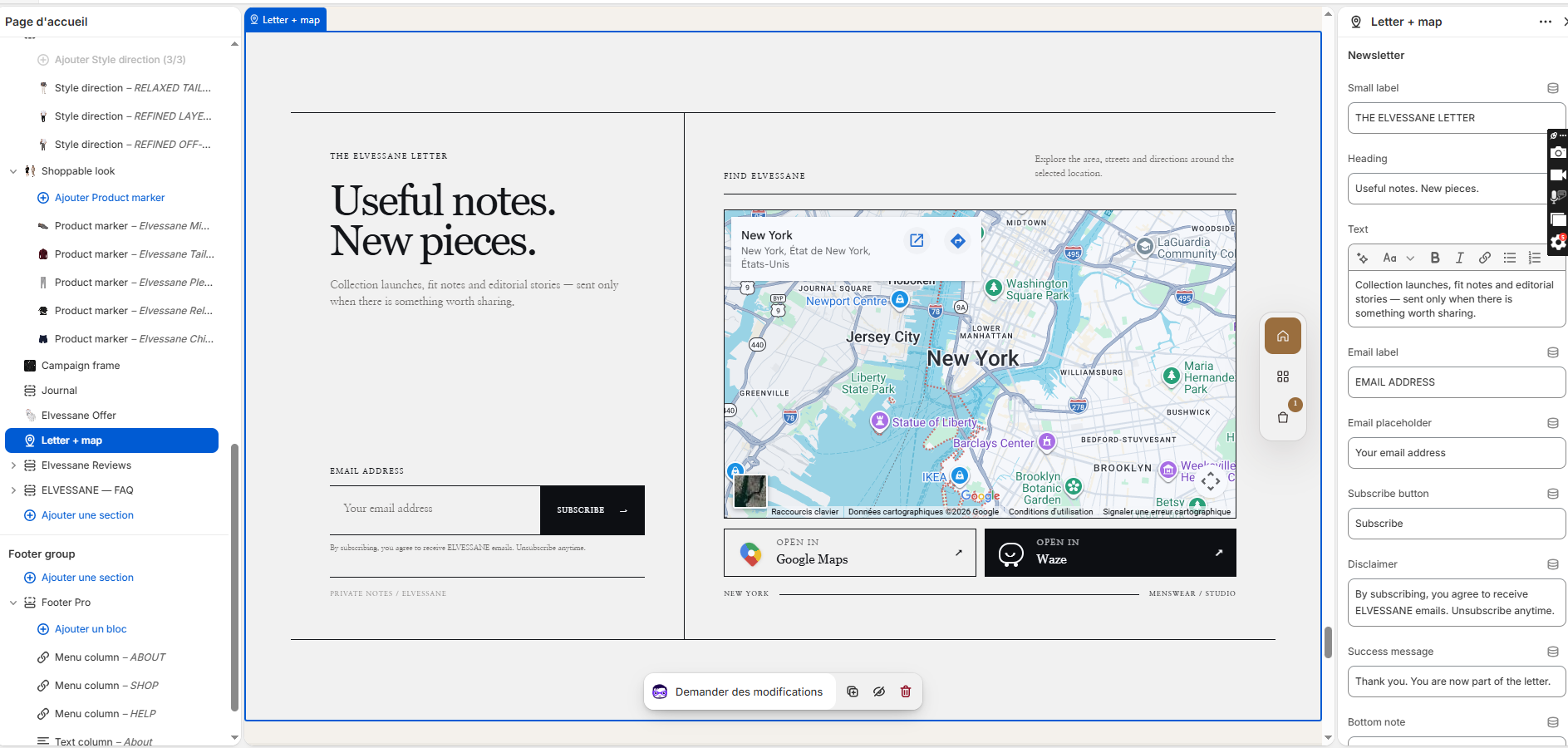
ev5-letter-map

Letter + Map

Letter + Map in the Shopify Theme Editor

Purpose

Newsletter capture paired with a map/location panel and Google Maps/Waze actions.

Recommended setup

  1. Set newsletter copy, labels and success message.
  2. Configure the merchant location.
  3. Provide Google Maps/Waze destinations where appropriate.
  4. Remove the map side if the merchant has no meaningful physical location.
Complete settings reference 29 settings
SettingTypeDefaultOptions
Newsletter
Small labeleyebrowtextTHE ELVESSANE LETTER
HeadingheadingtextUseful notes. New pieces.
Texttextrichtext<p>Collection launches, fit notes and editorial stories — sent only when there is something worth sharing.</p>
Email labelemail_labeltextEMAIL ADDRESS
Email placeholderemail_placeholdertextYour email address
Subscribe buttonbutton_labeltextSUBSCRIBE
DisclaimerdisclaimertextBy subscribing, you agree to receive ELVESSANE emails. Unsubscribe anytime.
Success messagesuccess_messagetextThank you. You are now part of the letter.
Bottom notenotetextPRIVATE NOTES / ELVESSANE
Map
Small labellocation_labeltextFIND ELVESSANE
Headinglocation_headingtextFind your way.
Map descriptionlocation_descriptiontextExplore the area, streets and directions around the selected location.
City or placemap_citytextSpain
Map zoommap_zoomrange12
Map typemap_typeselectroadmapRoad map, Satellite
Custom Google Maps linkgoogle_maps_urlurl
Waze linkwaze_urlurl
Map footer notelocation_notetextLOCATION / DIRECTIONS
Layout
Maximum widthmax_widthrange1750
Left and right spaceside_spacerange54
Top and bottom spacevertical_spacerange44
Colors
Backgroundbackgroundcolor#F2EDE6
Texttext_colorcolor#181818
Muted textmuted_colorcolor#6B665F
Linesline_colorcolor#181818
14

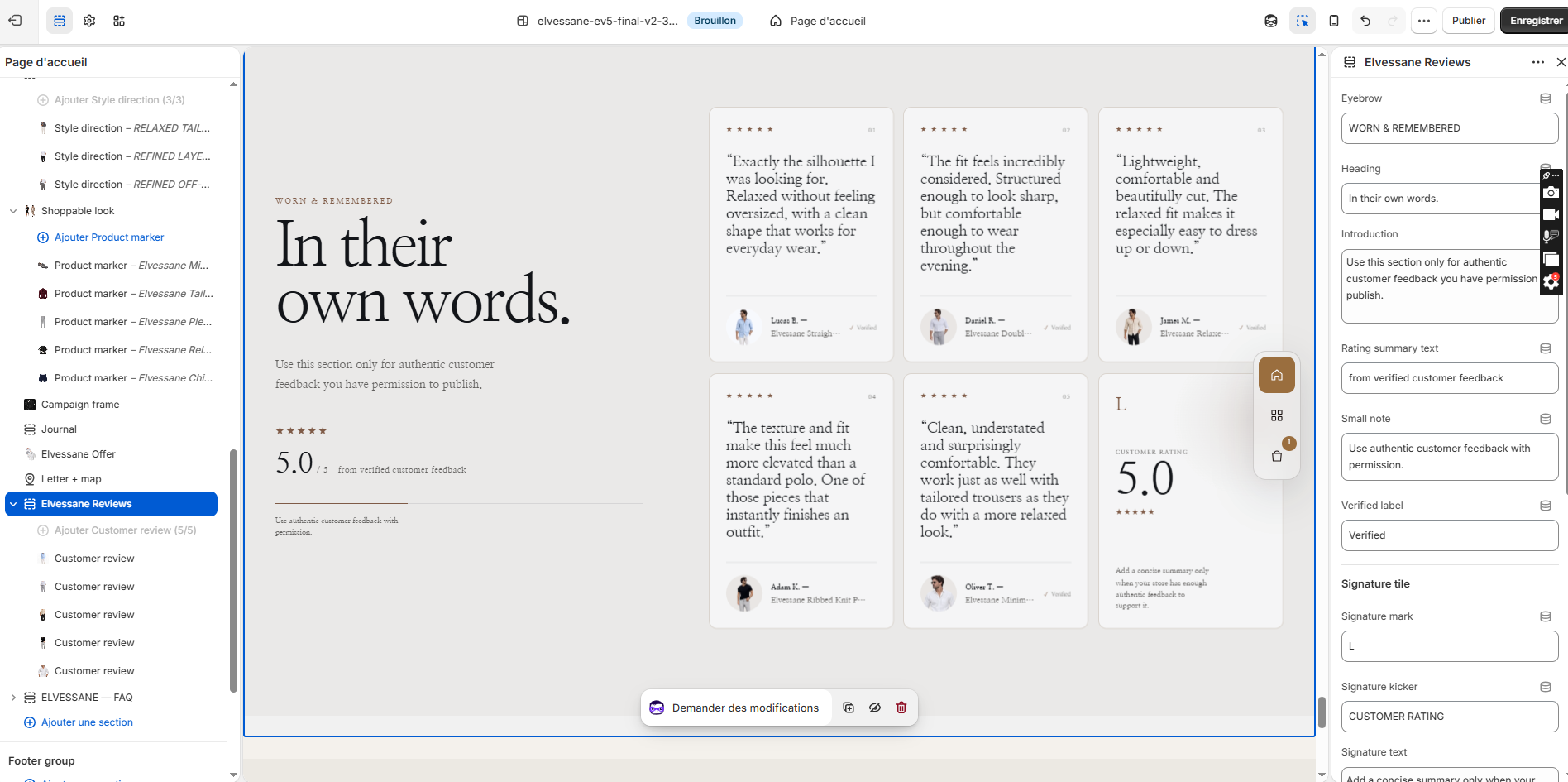
ev5-reviews

Reviews

Reviews in the Shopify Theme Editor

Purpose

Editorial customer review grid and rating summary.

Recommended setup

  1. Add customer review blocks.
  2. Use only authentic feedback with permission.
  3. Set rating summary and verified label appropriately.
  4. Do not publish demo quotes as real reviews on a live merchant store.
Complete settings reference 18 settings
SettingTypeDefaultOptions
EyebroweyebrowtextWORN & REMEMBERED
HeadingheadingtextIn their own words.
IntroductiontexttextareaUse this section only for authentic customer feedback you have permission to publish.
Rating summary textsummary_texttextfrom verified customer feedback
Small notenotetextUse authentic customer feedback with permission.
Verified labelverified_labeltextVerified
Signature tile
Signature marksignature_marktextL
Signature kickersignature_kickertextCUSTOMER RATING
Signature textsignature_texttextareaAdd a concise summary only when your store has enough authentic feedback to support it.
Design
Card radiuscard_radiusrange10
Backgroundbackgroundcolor#ECE9E3
Card backgroundcard_backgroundcolor#F7F5F1
Texttext_colorcolor#171717
Muted textmuted_colorcolor#66615A
Accent / starsaccentcolor#8A5B3D
Card borderborder_colorcolor#DED4C8
Customer review testimonial
SettingTypeDefaultOptions
Ratingratingrange5
ReviewquotetextareaAdd an authentic customer quote here.
Customer imageimageimage_picker
Customer nameauthortextCustomer name
Customer detaildetailtextPurchased item
Show verified badgeverifiedcheckboxOff
15

ev5-faq

FAQ

Purpose

Accordion for high-frequency fit, delivery, returns and garment care questions.

Recommended setup

  1. Add FAQ blocks in buying-journey order.
  2. Link answers to Size Guide, Shipping & Returns or Contact pages where useful.
  3. Keep answers short; detailed policies belong on dedicated pages.
  4. Test accordion keyboard operation.
Complete settings reference 8 settings
SettingTypeDefaultOptions
EyebroweyebrowtextGOOD TO KNOW
HeadingheadingtextQuestions, considered.
Introductiontextrichtext<p>Give customers clear answers before they need to ask.</p>
Open the first questionopen_firstcheckboxOff
Backgroundbackgroundcolor#ECE9E3
Texttext_colorcolor#171717
Answer textmuted_colorcolor#66615A
Accentaccentcolor#8A5B3D
Question question
SettingTypeDefaultOptions
QuestionquestiontextWhen will my order be dispatched?
Answeranswerrichtext<p>Available delivery methods and estimates are shown at checkout.</p>